What's New
SpaceONE strives to continuously update with new features.
We regularly provide a variety of news updates.
2025년 1월 업데이트
January 20, 2025
2024년 11월 업데이트
November 22, 2024
2024년 10월 업데이트
October 23, 2024
2024년 8월 업데이트
August 22, 2024
2024년 7월 업데이트
July 24, 2024
2024년 6월 업데이트
June 19, 2024
2024년 5월 업데이트
May 22, 2024
2024년 4월 업데이트
April 30, 2024
2024년 3월 업데이트
March 26, 2024
2024년 2월 업데이트
February 27, 2024
2024년 1월 업데이트
January 25, 2024
November 2023 Update
November 30, 2023
October 2023 Update
October 30, 2023
2023년 8월 업데이트
August 29, 2023
2023년 6월 업데이트
June 27, 2023
May 2023 Update
May 30, 2023
April 2023 Update
April 25, 2023
March 2023 Update
March 28, 2023
February 2023 Update
February 28, 2023
December 2022 Update
December 27, 2022
November 2022 Update
November 29, 2022
Asset Change History(변경관리 이력)
July 29, 2022
March 2023 Update
March 28, 2023
Hello, this is Megazone Cloud SpaceONE.
We are introducing updated and improved features in March 2023!
1. Service Portal
: Introducing newly reflected update news on the SpaceONE homepage.
1.1 Open Source Page Release
A page for SpaceONE's open source project, Cloudforet, has been newly opened!
It contains information about Cloudforet and stories registered in the LF project.
We look forward to expanding connectivity between homepages and continuous updates to activate the community.

1.2 Multilingual Support
Translation support has been expanded from Korean/English only to include Chinese/Japanese on the service portal.
To enter the global market, SpaceONE will support various languages and expand.
You can flexibly support user environments through browser language settings and change to the desired language for confirmation.

2. Asset Inventory
: The 'logs' tab, where you can easily view all log data for the entire service, has been released.

2.1 Full Log Data Inquiry
Who made the account that hasn't been accessed for a year? Who made this server?
If you've been searching for log data all day to track events, STOP right away!
At SpaceONE, a new log tab for directly checking log data for specific operations has appeared.
Utilizing the AWS CloudTrail function, you can easily check change logs from the SpaceONE console.

⓵ After accessing the console, click the [Asset Inventory] → [Cloud Service] button to navigate to the page.

⓶ Select the cloud service you want to verify.

⓷ Select the specific server for which log data verification is required.
⓸ Select the log tab at the bottom.
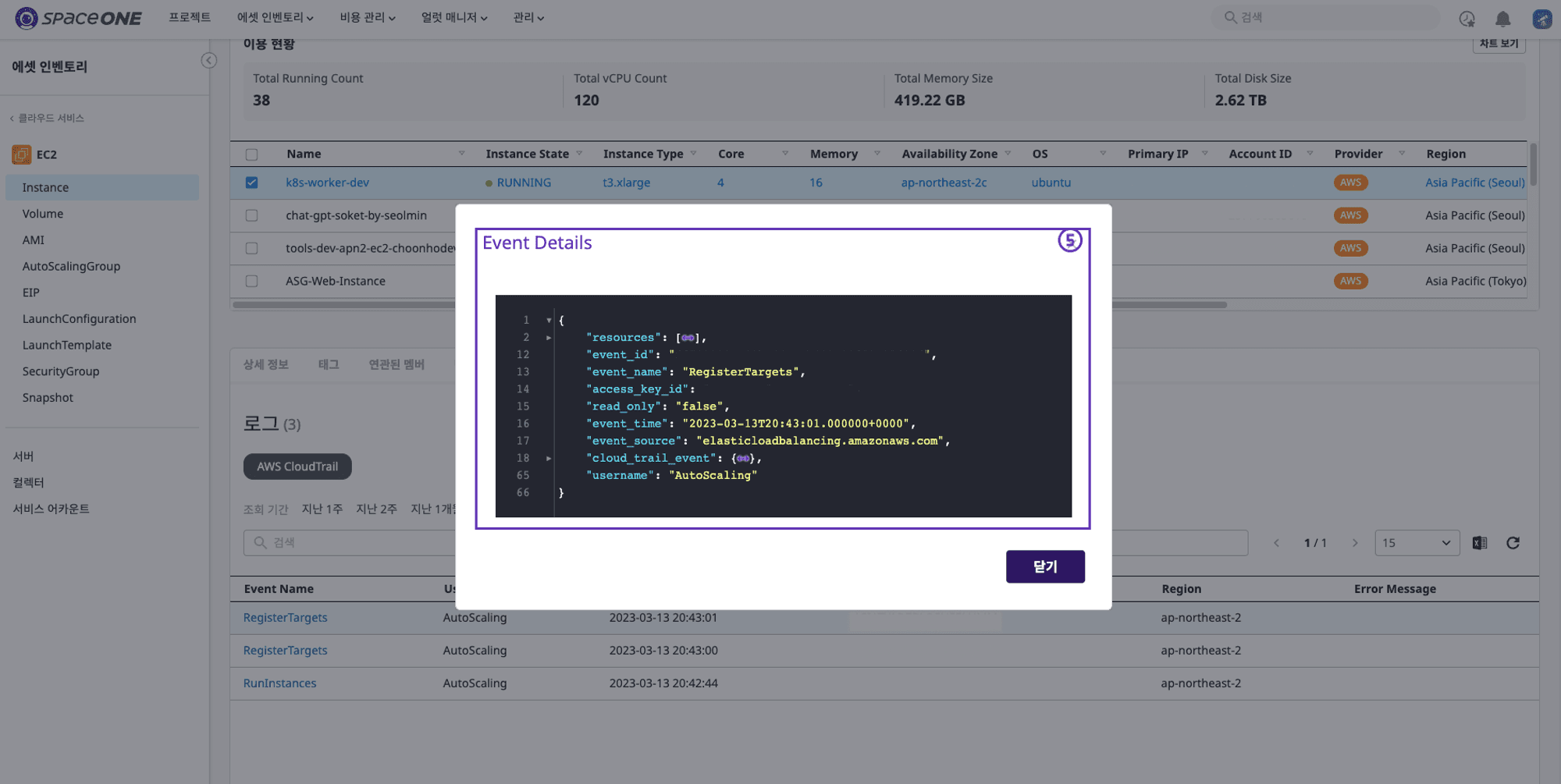
⓹ Detailed log data can be viewed.
3. Bugs & Fixes
Asset Inventory
Issue fixed where the Service Account filter query did not work on the cloud service page.
Cost Explorer
Fixed issue with Budget Status appearing differently on the Dashboard.
Console Service
Issue of login failure after changing the Google SSO javascript library has been resolved.
